
Rust学习笔记记录
Day 1 入门
1、 rust 环境搭建
2、rust 创建工程
cargo new xxx 、cargo build (–release) 、cargo run、cargo check.
3、错误处理
except 相当于 go的panic
1 | match xxx { |
4、包管理
在toml文件下添加指定包 回到cargo.io去索引 cargo update 更新索引。
包函数的引用 String::new() 用“::”分割
5、let mut
默认新建变量为不可变变量,如要修改需要加上mut
6、loop
{ continue ;break} 相当于go的 for {continue break}
Day2 基础概念以及所有权
1、shadowing
隐式变量 及用相同的变量名重新声明一次,在后续的代码中 改变量名即是代表新的变量。
let 声明隐式变量 类型可以和原变量不同
2、数据类型
rust 是静态变异语言,在类型比较多时编译器无法判断,必须在编译时要确定变量类型,不然会报错。
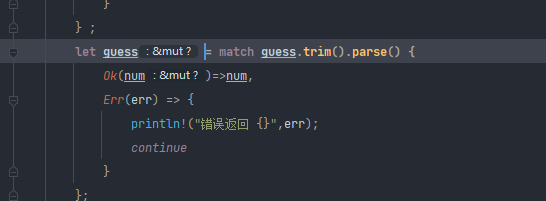
但有时某些情况编译器能够推断变量的具体类型:如下

isize usize 取决于计算机位数
整形默认类型i32 浮点类型默认 f64
字符类型 (:char) != 字符串(:&str)
复合类型
1、Tuple (元组)
数据类型可以不同 长度固定
1 | let tup :(i32,f64,u8)= (500,6.4,1); |
2、数组
数据类型必须相同 长度固定
还有一个vector (类似go的切片?)
1 | let a:[i32;5]=[1,2,3,4,5] 申明一个长度为5 的内容为值类型i32的数组 |
不像go 有默认初始值 要想使用 就必须赋值。
数组越界 编译会通过 但是运行会报错。
3、函数
关键字 fn
命名为蛇形 命名法 fn test_function(){}
函数声明类似go 不需要注重顺序
传输参数需要注明类型
函数返回值默认为最后一个语句,若提前返回需要用return。
4、控制流
1、if else
表达式的条件必须是bool类型
2、match
3、loop,while,for
for 中有 for xx in x.iter() 类似 go中 for range 不过此处是直接取的地址
for num in 1..4{} 遍历[1:4]
5、所有权(核心特性)
Stack and Heap 栈和堆
栈空间 有固定已知的数据大小
堆空间内存组织性较差,可存储大小不固定,申请内存叫做分配。
只存在栈空间的类型可以直接复制 移动or 复制
存在于堆空间类型的数据直接复制数据浅复制 相当于移交所有权 ,之前的变量失效,除非使用clone
Copy 和Drop trait方法只能拥有一个
Copy 简单标量类型可以直接复制的都有copy
1、想要使用值但是不移交所有权 就需要使用引用 & 指针
任意给定时刻,只能满足一个条件:
- 一个可变的引用
- 任意不可变引用
引用必须一直有效 不能成为悬空指针
1 | let mut s = String::from("hello"); |
Day3 结构体以及关联数据
1、struct定义和实例化
定义声明
1 | struct User{ |
实例化
1 | let mut user1 = User{ |
- 实例化时需要给所有的字段赋值
- 使用点标记法取某个值
- 一旦实例可变 其中所有的字段都可变
- 可作为函数的返回值
- 当字段名和变量名重名时,可以使用初始化方式简写
更新语法
1 | let user2 = User{ |
2、Tuple struct 元组结构
1 | struct Color(i32,i32,i32); |
3、Unit-Likt Struct 空结构体
用于实现某个类型trait 但是又没有数据,类似golang的空结构体
4、struct 数据的所有权
该struct实例拥有其所有的数据。只要实例有效,那么字段的数据也是有效的。
struct 里面也可以使用引用,但是要使用生命周期。
5、struct 例子
1 | println!("{}",user1)//错误 |
6、struct 方法
- 需要在impl块里面定义
- 参数可以使&self 或者说直接获得所有权或 或者可变借用 可其他参数一样 类似go 中的方法 区别是多了一个 所有权方式
1 | impl Rectangle{ |
7、关联函数
在 impl 中,但是不是self 作为一个参数的函数 使用 :: 引用
例如 : String::from(“123”)
1 | impl Rectangle { |
Day4 枚举与模式匹配
1、枚举
- 定义枚举 示例 IP地址
1 | enum IpAddrKind{ |
- 枚举支持自己的数据类型 配合match 能实现很多功能
1 | enum IpAddrKind{ |
Option 类型 Rust 中没有null 类型
1
2
3
4
5
6
7
8
9
10
11
12
13
14
15
16
17
18
19
20
21
22
23
24
25enum Option<T> {
Some(T), // 用于返回一个值 used to return a value
None // 用于返回 null ,虽然 Rust 并不支持 null
}
使用示例:
fn main() {
match is_even(5) {
Some(data) => {
if data==true {
println!("Even no");
}
},
None => {
println!("not even");
}
}
}
fn is_even(no:i32)->Option<bool> {
if no%2 == 0 {
Some(true)
} else {
None
}
}
2、match 控制流运算
match 匹配必须穷举所有的模式
可以使用下划线通配符 “_” 匹配其他类型 相当于go的default
1 | switch{ |
1 | match 绑定值 |
3、if let
1 | if let 可以看做match的语法糖 只处理其中一种模式 |
Day5 包,单元包,模块
1、 Package Crate Module
package 包 cargo 特性 可以构建 测试 共享crate。
crate 单元包 模块树 可以产生Libary 或者可执行文件。
Module 、 use: 用来控制代码阻止、作用域 私有路径
path : 为strcut function module 命名的方式。
Crate 类型:
- binary 二进制文件
- libary 库文件
Crate Root:
源代码文件
从这里开始编译,组成crate的根module
一个Package:
- 只能包含一个cargo.toml 描述了如何构建crates
- 只能包含0-1个libary Crate
- 可以包含任意个binary crate
- 至少有个一个crate
2、path 路径
- 类似语言中的命名空间有两种形式
- 绝对路径:从 crate root开始 使用crate名 或 字面值crate
- 相对路径 从当前模块开始使用self 或者super 或者当前模块的标识符
- 路径至少有一个标识符组成,标识符之间使用::
3、super,pub,struct,enum
super 访问父级目录类似文件系统中的 ../
1
super::super::eat_at_restaurant();
pub struct 里面的字段要是公共的也必须得加上pub 关键字
1
2
3
4pub struct Breakfast {
pub toast:String,
pub(crate) season_fruit:String,
}pub enum 枚举定义为公共的 其里面的定义也必须公共才行
1
2
3
4pub enum Number {
One,
Two,
}
4、 use 关键字
use的习惯用法
函数:一般将父级模块引入作用域,然后再使用。(指定到父级,便于区分)
1
2
3
4
5
6
7use super::hosting;
pub fn fix_incorrect_order(){
hosting::add_to_list();
println!("fix order");
super::super::eat_at_restaurant();
}struct,enum,其他 :指定完整路径 (指定到本身)
1
2
3use std::collections::HashMap;
let mut map = HashMap::new();
map.insert(1,2);同名条目:
指定到父级
1
2
3
4
5
6
7
8
9
10
11
use std::fmt;
use std::io;
fn f1() -> fmt::Result{
Ok(())
}
fn f2() -> io::Result<String> {
Ok("".to_string())
}
用as 替代
1
2
3
4
5
6
7
8
9use std::fmt::Result;
use std::io::Result as IoResult;
fn f1() -> Result{
Ok(())
}
fn f2() -> IoResult<String> {
Ok("".to_string())
}
使用pub use 重新导出名称
使用导入到作用域,该名称是私有的
pub use 可以重新导出 用于外部引用
1
2//示例:
pub use crate::front_of_house::hosting;
使用外部的包(package)
标准库std 也是外部包但是不用修改toml (类似go的内置函数和gomod 里面的第三方包)
cargo.toml 添加依赖的包
用use 将特定的条目引到作用域
使用嵌套路径清理大量use 语句
1
2
3
4
5
6
7
8
9
10//use std::io;
//use std::cmp::Ordering;
//转换成
use std::{io,cmp::Ordering};
// use std::io;
// use std::io::Result;
//转换成self 代替自身
use std::io::{self,Result};通配符 *
使用通配符可以将路径里面所有的公共条目都引入到作用域中
但是需要注意使用场景
应用场景:测试时将所有的测试代码引入到tests 模块 ,用于预导入模块(prelude)
将模块内容移动到其他文件
定义模块时,如果后面不是代码块,而是 “;”
- Rust 会从同名的文件中加载内容
- 模块的结构树不会变
如果在被引用模块文件中再引入其他模块,则需要建立一个被引用模块的目录,然后再建立一个同名文件
1
2
3
4
5
6
7
8示例
├── back_of_house.rs
├── front_of_house
│ └── hosting.rs
├── front_of_house.rs(pub mod hosting;)
├── lib.rs(pub mod front_of_house; pub mod back_of_house;)
├── main.rs
Day6 通用类型
1. Vector
1. 创建Vector
Vec
叫做vector (类似golang里面的slice 切片) - 由标准库提供
- 存储多个值
- 类型必须相同
- 在内存中连续存放的
Vec::new 函数
1
2let v: Vec<i32> = Vec::new();
//类似 var v = make([]int32,0)使用指定初始值创建Vec
1
2let v = vec![1,2,3];
//类似 var v = []int32{1,2,3}
2. 更新Vector
- 像vector 里面添加元素,使用push方法。
1 | let mut v = Vec::new(); |
3. 删除Vector
- 和其他的struct 一样,当vector 离开作用域之后,他就会被清理,所有的元素也都会被清理。
4. 读取Vector
使用索引的方式(超出索引范围会导致panic)
1
2let v = vec![1,2,3,4,5];
let third = &v[3];使用get 方法 (比较安全不会panic)
1
2
3
4
5
6
7
8
9let v = vec![1,2,3,4,5];
match v.get(3) {
Some(third) =>{
println!("the third element is {}", third);
}
None =>{
println!("there is no third element")
}
}不能同时存在一个可变的引用和不可变的引用
1
2
3
4
5
6
let mut v = vec![1,2,3,4,5];
let third = &v[3];
println!("the _third element is {}",third);
v.push(1);
//此处会报错遍历Vector
1
2
3
4
5
6
7
8//可变引用遍历
for i in &mut v {
*i += 50
}
//不可变引用遍历
for i in &v {
println!("{}",i)
}
5. Vertor+Enum
创建枚举类型的Vector
1 | pub enum SpreadsheetCell{ |
2. String 字符串
1. 字符串是什么
- Rust核心层面,只有一个字符串类型:字符串切片 str (或者说 &str 字符串切片的引用)
- 字符串切片:就是对存储在其他地方、UTF-8 编码的字符串的引用。
- 字符串字面值:存储在二进制文件中,也就是字符串切片。
- String 类型:
- 来自标准库,而不是核心语言
- 可增长,可修改,可拥有
- UTF-8 编码
2. 通常说的字符串
- 指的 String 和 &str 这两种类型
- 其他的字符串类型 :OsString,OsStr,CString,CStr 等等
- String 结尾 可以获得所有权的
- Str结尾 可以借用的
- 可以存储不同编码的文本,在内存中的展现形式也就是布局不同。
- Library crate 针对存储字符串可提供更多的选项。
3. 创建一个新的字符串 (String)
很多Vec
的操作都可以用于String String::new
1
let mut s1 = String::new();
to_string 方法
1
2let data = "initial contents";
let s2 = data.to_string();String::From
1
let s3 = String::From("hello");
4 . 更新字符串
push push_str
1
2
3
4
5
6let mut s = "hello".to_string();
println!("default s {}",s);
s.push_str("world"); //将一个字符串切片附加到String
println!("push_str {}",s);
s.push('l'); // push 这里是char 类型 , 字符类型 将单个字符附加到String
println!("push {}",s);直接使用 +
1
2
3
4
5
6
7
8let s1 = String::from("Hello, ");
let s2 = String::from("World!");
let s3 = s1 + &s2;
// + 类似使用了 fn add (self ,s :&str) -> String {...}
//s1 的所有权已经被移交了 但是s2 由于是被引用的类型 以所有权还在
// println!("s1 {}",s1); //此处无法打印,s1 所有权已经没有了
println!("s2 {}",s2);
println!("s3 {}",s3);format 相加
1
2
3
4
5let s1 = String::from("tic");
let s2 = String::from("tac");
let s3 = String::from("toe");
let s = format!("{}-{}-{}",s1,s2,s3); //这个并不会移交所有权
println!("s {}",s);
5. 表示形式和切割
对String 进行索引形式的访问
1
2
3
4//索引字符串
let s1 = String::from("hello");
//let h = s1[0]; // 不支持索引类型的访问
//Rust 不允许对String 进行索引的原因 索引的耗时应该是(O(1)) 时间,但是String无法保证,需要遍历所有的内容才能确定有多少个合法的字符。作为bytes 遍历
1
2
3for b in s1.bytes() {
println!("byte {}",b)
}作为unicode 标量遍历
1
2
3for c in s1.chars() {
println!("char {}",c)
}作为字形簇处理 标准库没有提供,需要用到第三方库
字符串切割
1
2
3
4let hello = "3中文你好";
let s = &hello[0..4];
// let s = &hello[0..3]; 当索引为3 的时候就会panic 因为3 不是字符串边界,是 “中”的中间。
println!("{}",s);
3. HashMap<K,V>
1. 创建
可以先定义后插入值,编译器会推断map 类型
1
2
3
4
5
6use std::collections::HashMap; //HashMap 不在Prelude 中
let mut source = HashMap::new();
source.insert("blue".to_string(),1);直接指定类型
1
2let mut source2:HashMap<String,i32> = HashMap::new();
source2.insert("red".to_string(),2);使用collect方法
1
2
3
4
5let teams = vec![String::from("Blue"),String::from("Yellow")];
let initial_scores = vec![10, 50];
//需要指明 需要生成 HashMap 但是具体的类型可以由rust 自行推断
let mut source3 :HashMap<_,_> = teams.iter().zip(initial_scores.iter()).collect();
source3.insert(&"red".to_string(), &2);
2. 所有权
实现了Copy trait 的类型, 值会被复制
拥有过所有权的值例如String,值会被移动,所有权会被移交。
1
2
3
4
5
6let mut source4 = HashMap::new();
let s1 = "Blue".to_string();
let s2 = "Yellow".to_string();
//这种写法所有权会移交
source4.insert(s1,1);
source4.insert(s2,2);如果插入引用,则值不会移动。
1
2
3//使用引用则不会被移交所有权
source4.insert(&s1,1);
source4.insert(&s2,2);Hash有效期期间内,其值也必须有效
3. 访问
get 拿到的是Option 类型 需要match 判断
1
2
3
4
5
6match source4.get(&s2) {
None => { } ,
Some(s) => {
println!("{}",s)
},
}遍历
1
2
3
4//一般遍历使用引用, 因为遍历之后还需要继续访问
for (k,v) in &source4{
println!("{},{}",k,v)
}
4. 更新
K 已经存在,对应一个V
替换现有的V
1
2
3println!("before update {:?}",source2);
source2.insert("red".to_string(),25);
println!("after update {:?}",source2);保留现有的V
1
2
3
4
5
6
7//不存在时才插入
//使用entry方法,检查指定的K是否存在对应的V 参数为K 返回为 enum Entry 代表值是否存在
// Entry 的 or_insert 方法 :
// 如果K 存在 则啥也不干 , 如果不存在则将方法参数作为新的V 插入进去 然后 返回一个V的可变引用 。
source2.entry("yellow".to_string()).or_insert(50); //将方法参数作为新的V 插入进去
source2.entry("red".to_string()).or_insert(50); //返回值
println!("after update2 {:?}",source2);合并现有的和新的V
1
2
3
4
5
6
7
8
9
10//基于现有值更新
let text = "hello world wondering world xx xx xx xx xx ";
let mut map = HashMap::new();
for word in text.split_whitespace(){
let count = map.entry(word).or_insert(0); // 类似 golang sync map 的LoadOrStore(),不过返回的是一个可以操作的指针变量 即可变引用。
println!("{}:{:#?}",word,count);
*count +=1;
}
println!("{:#?}",map)
K 不存在
- 直接添加一对K,V
4. Hash 函数
- HashMap默认使用的hash 函数不是最快的,但是具有更好的安全性
- 可以指定不同的harsher(实现BuildHasher trait 的 类型) 来切换到另外的函数。
Day7 错误处理
1、panic!
默认情况下,panic时
- 展开调用栈,工作量大
- rust沿着调用栈往回走
- 清理遇到的每个函数中的数据
- 立即终止调用栈
- 不清理内存,直接停止程序
- 内存需要OS清理
- 展开调用栈,工作量大
需要二进制更小时,将展开改为终止,在cargo.toml 中的profile 设置 panic = “abort”
1
2[profile.release]
panic = "abort"可以设置RUST_BACKTRACE=1 得到回溯信息
2、Result枚举
1、Rust是一个枚举值
1 | enum Result<T,E>{ |
T:操作成功是,Ok变体里面返回的数据类型
E:操作失败后,Err变体里面返回的错误数据类型
匹配处理不同的错误
1
2
3
4
5
6
7
8
9
10
11
12
13
14
15
16
17
18
19
20
21let f = File::open("xxx.txt");
/*
let mut _f = match f {
Ok(file) => file,
Err(error) => match error.kind() {
ErrorKind::NotFound => match File::create("xxx.txt") {
Ok(fc) => fc,
Err(error) => panic!("error creating file: {:?}", error),
},
other_error => panic!("error creating file: {:?}", other_error),
},
};
*/
//使用闭包优化后的处理
let mut _f = f.unwrap_or_else(|error| match error.kind() {
ErrorKind::NotFound => match File::create("xxx.txt") {
Ok(fc) => fc,
Err(error) => panic!("error creating file: {:?}", error),
},
other_error => panic!("error creating file: {:?}", other_error),
});
2、unwarp,expect
1 |
|
3、传递错误
- 返回类型为一个Result 类型
1 | pub fn open_file(path: &str) ->Result<String, io::Error> { |
- ? 运算符 与from 函数
1 | // 相当于 成功给f赋值,失败将ERR直接返回调用return |
4、 何时使用panic!
可以使用的场景
演示场景:unwrap
原型代码:unwarp,expect
测试代码:unwarp,expect
确定代码一定没有错误的情况:unwarp
1
let home: IpAddr = "127.0.0.1".parse().unwrap();
错误处理建议
- 当代码处于损坏状态时,使用panic!
- 损坏状态:某些假设保证约定或者不可变性被打破。